

Sylvie AI and Robotics Controller
ATMega family controller | DIY controller | Robot controller
SKU: ai-drive-sylvie-1Brand: STEMCity
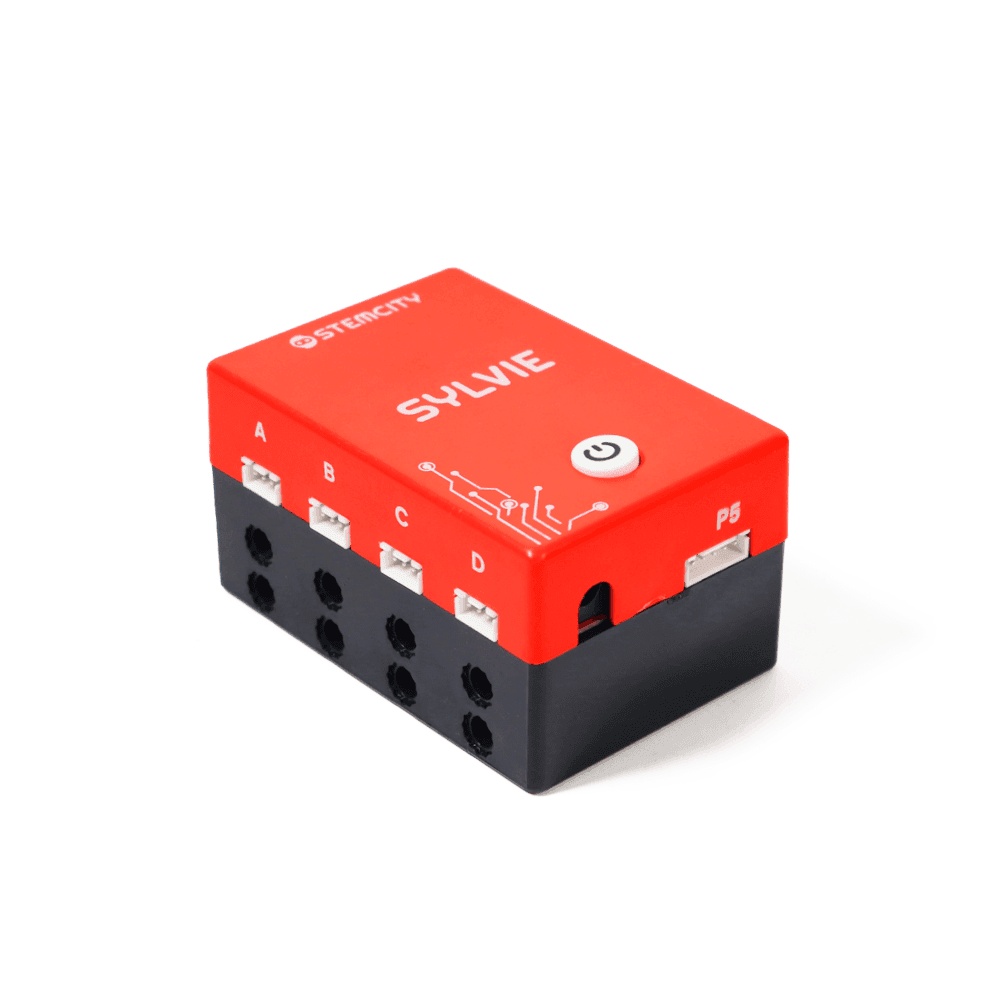
Sylvie AI and Robotics Controller
ATMega family controller | DIY controller | Robot controller
SKU: ai-drive-sylvie-1Brand: STEMCity
The Sylvie Robotics Controller is a programmable controller based on the ATmega family, designed to help students explore electronics, coding, robotics, and automation through hands-on projects. It features 6 input ports, 4 output ports, and 2 dedicated servo motor ports,…
₹1,499.00
₹2,999.00
Product information
The Sylvie Robotics Controller is an educational electronics and robotics controller designed for hands-on learning and project development. Based on the ATmega family, it features 10 input and output ports, including 6 input ports and 4 output ports, along with 2 dedicated servo motor ports for controlled movement in robotics applications. It supports both JST and female jumper-cable connections, providing flexibility when connecting compatible sensors and electronic components.
The controller features USB-C connectivity for programming through supported software such as STEMblock, Arduino IDE, and PictoBlox. Its compact red-and-black enclosed design comes with an inbuilt battery, LED, and buzzer, making it suitable for different electronics, robotics, sensor-based, and automation projects. Recommended for students from Grade 4 onwards, Sylvie provides a practical way to understand programming, electronic connections, and controller-based project development.
Key Features
- ATMEGA-BASED PROGRAMMABLE CONTROLLER - Sylvie is based on the ATmega family and works as the control unit of electronic and robotics projects. It allows students to upload programs, process input signals, and control connected electronic components through programmed instructions.
- 10 INPUT AND OUTPUT PORTS - Features 6 input ports and 4 output ports for connecting compatible sensors and electronic components. These connections allow students to experiment with different inputs and outputs while developing interactive electronics and automation projects.
- DEDICATED SERVO MOTOR PORTS - Comes with 2 dedicated servo motor ports for connecting compatible servo motors. These ports are useful for robotics applications involving controlled movement, such as robotic arms, automatic doors, and other mechanical systems.
- DUAL CONNECTION OPTIONS - Supports both JST and female jumper-cable connections, making it convenient to connect compatible electronic components. These connection options offer flexibility when setting up circuits and assembling different STEM projects.
- USB-C CONNECTIVITY AND PROGRAMMING SUPPORT - Features a USB-C port for connecting Sylvie to a computer or laptop. Students can use supported programming environments such as STEMblock, Arduino IDE, and PictoBlox to write, upload, and test programs for their projects.
- BUILT-IN BATTERY, LED AND BUZZER - Comes with an inbuilt battery, LED, and buzzer to support suitable electronic, indicator, and alert-based project applications. These built-in features also allow students to explore basic output functions without always requiring separate components.
- COMPACT ENCLOSED DESIGN - Features a distinctive red-and-black outer casing with labelled connection ports. Its enclosed design keeps the controller components together and makes it convenient to handle, connect, and use during regular classroom activities and project work.
- WIDE PROJECT COMPATIBILITY - Suitable for developing projects using compatible sensors, servo motors, and other electronic components. It can also be used with supported Arduino Uno and Arduino Nano configurations, subject to the required board settings, connections, and software support.
- IDEAL FOR STEM AND ROBOTICS LEARNING - Recommended for students from Grade 4 onwards, Sylvie helps learners explore programming, electronics, sensor interfacing, robotics, and basic automation. It encourages hands-on experimentation, logical thinking, problem-solving, and creative project development.
- TESTED AND READY TO USE - A 100% tested and working model designed for educational electronics, robotics experiments, and hands-on STEM activities. It provides students with a practical starting point for developing and testing their own project ideas.
Versatile Project Applications
The Sylvie Robotics Controller can be used to develop a variety of educational, electronic, and practical projects. Some project ideas students can explore include:
- Robotics Projects: Connect compatible motors, servo motors, and other electronic components to build robots that perform programmed movements. Students can experiment with robotic arms, moving structures, and simple automated mechanisms.
- Electronics Projects: Explore how different electronic components work together by connecting them to the input and output ports. Build simple circuits and experiment with LEDs, buzzers, sensors, and other compatible components.
- Science Projects: Develop interactive science models that demonstrate scientific concepts using sensors and electronic components. Students can create working models that respond to changes in their surroundings.
- Safety and Alert Systems: Build basic alert-based projects using compatible sensors and output components. For example, a sensor can detect a particular condition and trigger an alert through a buzzer or LED using programmed instructions.
- Sensor-Based Projects: Connect compatible sensors to detect environmental changes or external conditions. The controller can process the incoming readings and perform programmed actions through connected output components.
- AI-Assisted Educational Projects: Explore projects that combine electronics and AI-based applications using suitable external processing hardware and supported software. Such projects may require additional components and processing capabilities beyond the Sylvie controller.
The Sylvie Robotics Controller is suitable for school students, teachers, robotics enthusiasts, electronics learners, and DIY makers looking to explore programming and practical electronics. With multiple input and output connections, dedicated servo motor ports, flexible connection options, and built-in features, it provides a convenient platform for experimenting with robotics, electronics, and automation.
How Does Sylvie Work?
Sylvie works as the control unit of an electronic or robotics project. It receives information through its input ports, processes the instructions in an uploaded program, and sends signals through its output ports to control connected electronic components.
The working process can be understood through three basic stages:
- Input: Compatible sensors or input devices send information to the controller through its input ports. For example, a sensor may detect movement, light, or a change in the surrounding environment.
- Processing: Sylvie processes the received information according to the instructions written in the uploaded program. The program determines what action should take place based on the input.
- Output: The controller sends signals through its output ports to operate connected components. These may include LEDs, buzzers, servo motors, or other compatible devices.
To get started, connect Sylvie to a computer or laptop using a USB-C cable. Open a supported programming environment, such as STEMblock, Arduino IDE, or PictoBlox, and prepare the program according to your project requirements.
Once the program is uploaded, the controller follows the programmed instructions and interacts with the connected components. This helps students understand how inputs, programming logic, and outputs work together to create an electronic or robotic system.
Please note: External sensors, motors, and other electronic components required for individual projects may need to be arranged separately. Check their voltage, connector type, port requirements, and compatibility before connecting them.
Package Contents
- 1 × Sylvie Robotics Controller